
Quick Reference Guide (QRG) #7-1-A
Last updated24 June 2026
Programming the Limits for 1st Generation Ignition Lock Motor 4270:
Used for Ignition Lock applications and have a 3” cable connected to programming pushbutton with light.it has 5-wires (2 wires connected to power, and red wire to ignition wire of vehicle. Blue and green wires connected to dash switch).
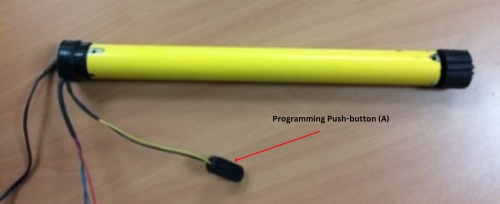
Programming the limits for Motor 4270:
1. Press the programming pushbutton (A), a faint LED light goes on; hold until the LED light becomes very bright and then release it.
2. Press & hold button (A) again, shade moves up; as soon as it reaches your desired top limit, release the button.
3. Press button (A) again, shade moves down; as soon as it reaches your desired bottom limit, release the button.
4. Next, program the 3rd limit (middle limit) by using the Dash Switch to move the shade to your desired 3rd that allows you only move the shade between top limit and middle limit while driving (ignition key is on).
5. Now press and hold the programming button (A) until it flashes twice, then release it. All your limits are now set.
6. Now test the 3 limits by operating the shade as follows:
-
Ignition key is OFF: by pressing switch Up/Down, your shade should travel all the way from top to bottom limit.
-
Ignition key is ON: by pressing switch Up/Down, your shade should only travel between the top limit and the 3rd limit (middle limit) and should NOT travel any lower than to this point.