
Quick Reference Guide (QRG) # 27
Limit Settings, Spring Operated Roller Shades, Tension & Limit AdjustmentLimit Settings, Tension and Limit Adjustment
Last updated24 June 2026
Manually Operated Roller Shades – SRS-500CE
Spring Tension (Speed) and Upper Limit Adjustment
Important:
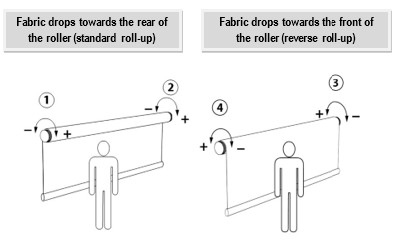
Before attempting any adjustment, whether for spring tension (speed) or for re-setting the upper limit, verify whether the shade you want to adjust has a standard or reverse roll-up since the adjusting wheels will be on different sides (see illustration below).
.jpg "Fabric-Drop-(1).jpg")
Spring Tension (Speed) Adjustment
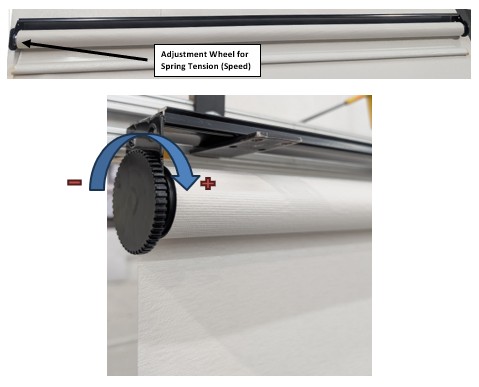
Your shades are factory tested and adjusted for the best performance by experienced and skilled technicians. Should you need to change the speed, you can do that easily by adjusting the spring tension with wheels (1) or (3) as per illustration above. No tools are required.
- Pull fabric height down 2”-3” beyond the factory-set top limit before adjusting the tension wheel
- To INCREASE the speed, turn the wheel to (+)
- To DECREASE the speed, turn the wheel to (-)
Top Limit Adjustment
The top limit stop of the shade can be adjusted if required by using wheel (2) or (4) as per first illustration above. Please ensure that the shade is in the factory-set upper limit stop position before turning any adjusting wheel. No tools are required. (Please note that there is no adjustment for the bottom position limit on this shades)
- To RISE the top limit stop, turn the wheel to (+)
- To LOWER the top limit stop, turn the wheel to (-)
The adjusting wheels for this procedure are also shown on the photograph below; we chose roller shade with the fabric rolling up from the back (standard roll-up). The limit adjusting wheel for the roller shade is on the right. Follow the same procedure if you have a reverse roll-up shade, by adjusting the tension wheel located on the left.
