
Quick Reference Guide (QRG) #21
WiringCorrect wiring of a Cellular Shade Motor
Last updated12 September 2023
Cellular Shades Wiring and Limit Adjustment Procedure
Wiring - Single-Shaft Motor

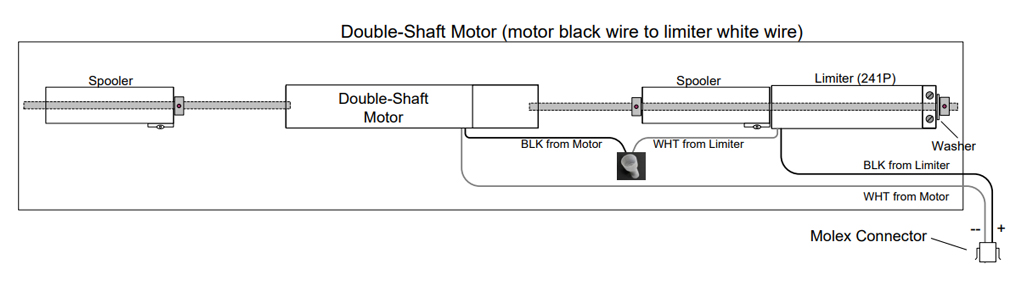
Wiring - Double-Shaft Motor
Limit Adjustment
- To adjust lower limit: Use top screw – turn clockwise (CW) to have shade stop further UP
- To adjust upper limit: Use bottom screw – turn clockwise (CW) to have shade stop further UP
For both Single-Shaft and Double-Shaft motors, after you have made sure your wiring was done correctly, check the proper operation of the shade, following these guidelines:
- When you press “DOWN” on the switch the shade should move downwards, with the shaft turning clockwise (i.e. with the Limiter on the right side and the two limit adjustment holes in the headrail facing you, the shaft needs to turn away from you in a clockwise motion). If not, swap the power wires.
- If you press “DOWN” on the switch but the shade goes up instead, stop the shade and press “UP” on the switch; as the shade now moves downward, keep pressing “UP” until the shade reaches the bottom and continues by reversing back up. The shade is now operating the way it should with the “UP”/”DOWN” buttons functioning correctly, then you have adjust the limits.
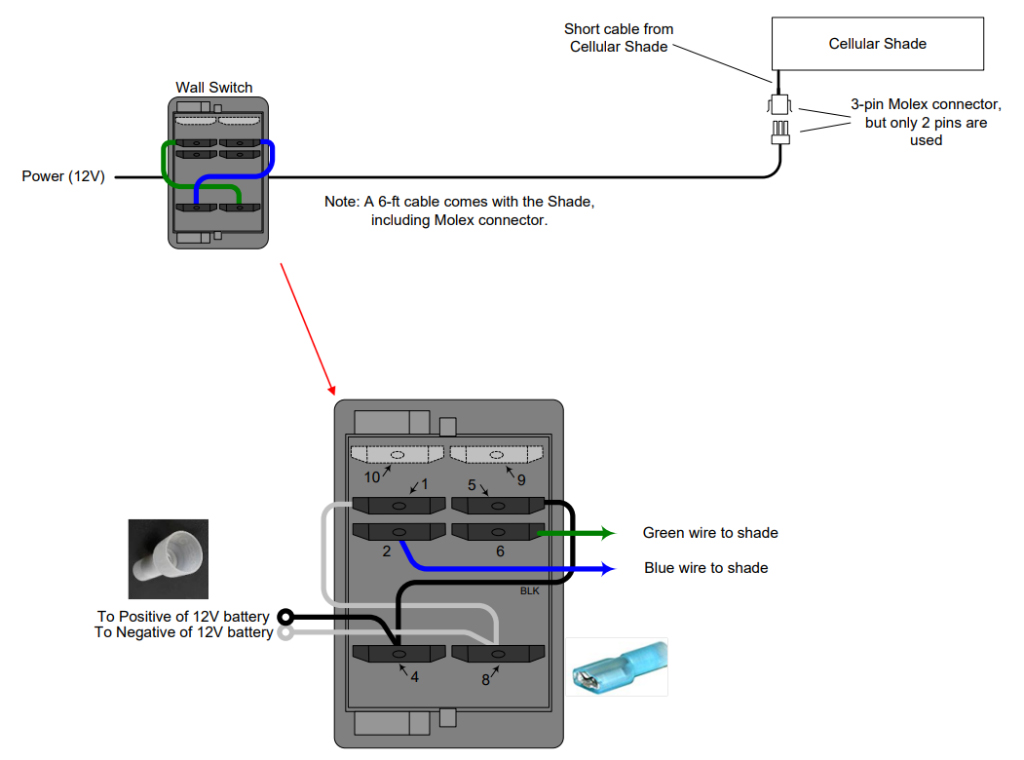
- If you want to control the cellular shade with the remote control, then you need to add 216P module as illustrated below:
